Completion management, from system register to commissioning
On large projects, completion status lives in spreadsheets, test records arrive late and documentation is missing at handover. TaskCtrl follows every technical system from the system register to tested and handed over, so the project sees what is ready for testing and what remains.
What completion management covers in TaskCtrl
Each technical system gets a row in the system register and is followed through installation, testing and handover.
-
System register
Every technical system with a unique number. The register supports any tagging system, so the project keeps the numbering it already has.
-
Mechanical completion
Mechanical completion is linked directly to test planning, so the test plan follows what is actually installed.
-
Test hierarchy
Tests in the order they depend on each other, with the dependencies visible. Test procedures can be reused on the next project.
-
Test records on mobile
Tests are carried out and signed on site, on mobile. The record is updated while the test is running.
-
Deviations with photos
Deviations are logged with photos against the right system and followed up until they are closed.
-
Status and O&M documentation
A dashboard shows progress per system. O&M documentation is collected along the way, ready for handover.
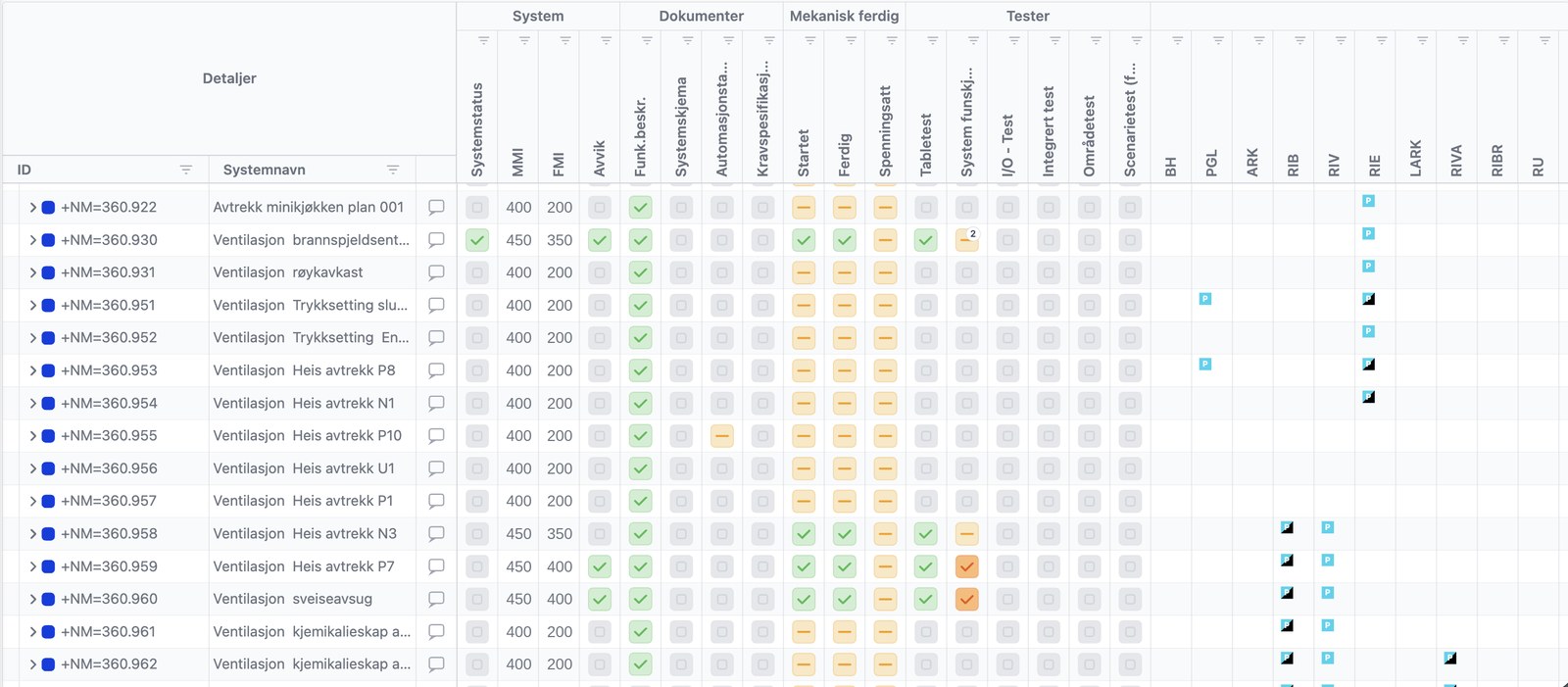
Completion management and commissioning
Commissioning verifies that the systems work as required, often carried out by an independent party. Completion management is the work that gets the project there: every system installed, checked and tested in the right order, with the documentation in place. With one status per system, commissioning starts when the systems are ready.
Built on systematic completion
TaskCtrl is built on the Norwegian guideline for systematic completion, a method that starts at project kickoff, not in the final phase. Read the guide to systematic completion and commissioning.
For the people who run completion
-
Completion manager
One register for all systems, with status from construction, testing and documentation in the same place.
-
Project manager
Progress per system and open deviations, without collecting spreadsheets from every discipline.
-
Contractors and subcontractors
Each discipline checks its own work and carries out tests on mobile, against the right system.
-
Owner and operations
O&M documentation collected per system, ready for handover.
From the projects
Project Lightning, El Paso, Texas
Faith Technologies (FTI) uses TaskCtrl on a 1 GW data center project.
Read about takt on the data center →E39 Herdal to Røyskår
The joint venture Implenia Stangeland (JVIS) processed 185,743 O&M documents in TaskCtrl.
Read the E39 case →Kuben, Bergen
COWI and Stoltz used TaskCtrl for systematic completion of the Kuben residential project in Bergen.
Read the customer case →Frequently asked questions
What is completion management software?
Software that follows every technical system from installation to handover: the system register, mechanical completion, tests, deviations and documentation. It shows what is built, what is tested and what remains before commissioning and handover.
Does TaskCtrl replace commissioning?
No. Commissioning verifies that the systems work as required. TaskCtrl gives the project the status per system and the documentation that commissioning depends on.
Does TaskCtrl work with our tagging system?
Yes. The system register supports any tagging system, so you can use the numbering the project already has.
Can test procedures be reused on the next project?
Yes. Test procedures can be reused across projects, so each new project starts from what worked on the last one.
How is O&M documentation handled?
Documentation is collected per system during the project, so it is ready for handover instead of being gathered at the end.
See TaskCtrl in action
Book a no-obligation demo and get a walkthrough tailored to your project or organization.